EasyOps Features | Digital Checklists, Audits & Food Safety Records
Start free trial →
Digital operations platform

Replace paper checklists, audits and logs with one digital system

Staff complete food safety records, daily checks and audits on any phone. Managers see what's done, what's overdue and what needs fixing - across every site - without chasing paperwork.

Free 15-day trial  ·  No credit card required  ·  Set up in hours
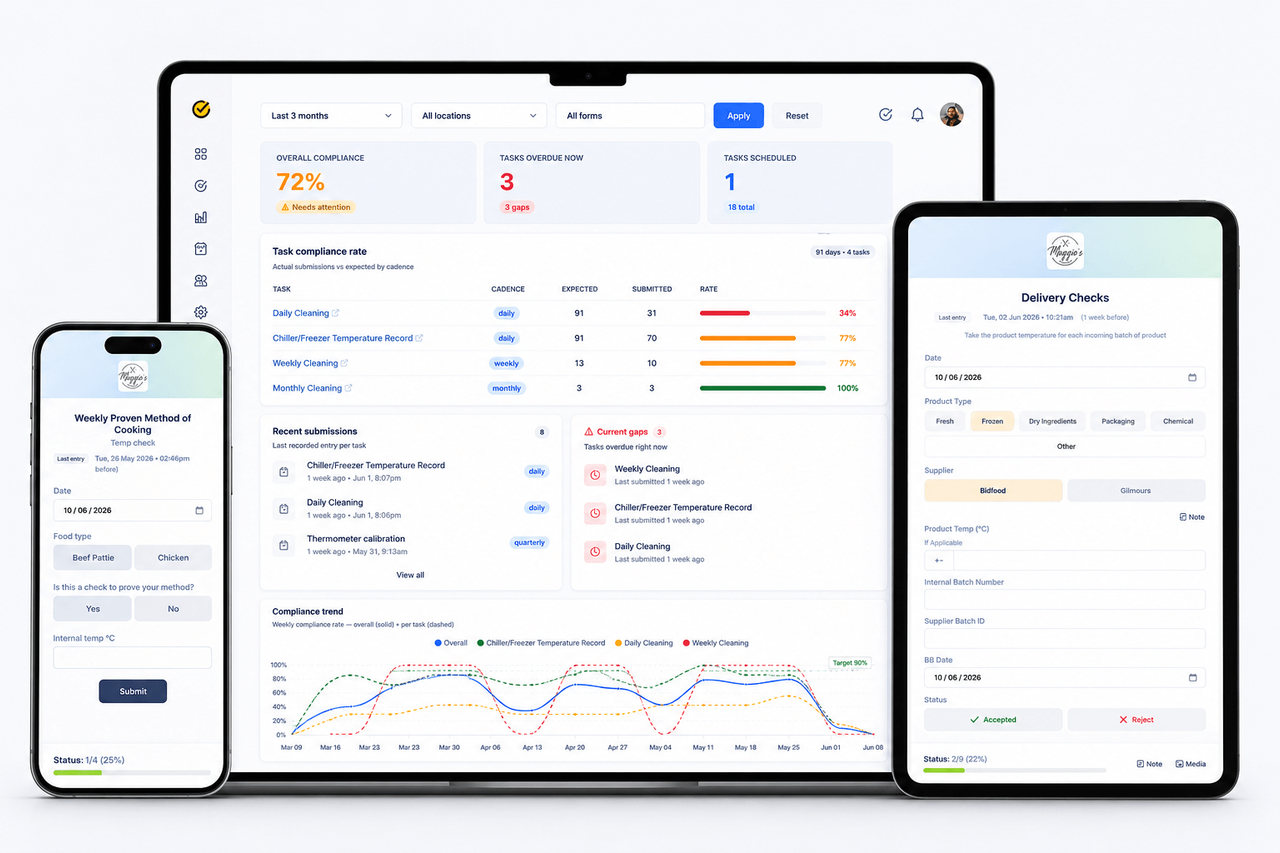
EasyOps dashboard showing compliance rates, overdue tasks and recent submissions
Features

One place to run work, prove it and improve it

Start with food safety, checklists and audits today. Expand to any frontline workflow tomorrow.

For staff

Quick to complete, on any phone

Simple forms your team can finish in seconds, on the floor, in the kitchen or at the delivery door.

Mobile forms & checklists

Temperature logs, opening and closing checks, cleaning records and audits, built for phones and tablets.

Photo evidence & notes

Attach photos and notes as part of the record. Date, time and staff name are captured automatically.

Installs like an app

Add EasyOps to any phone's home screen straight from the browser - no app store, nothing to update.

Arabic & English

Set up labels and checklists in Arabic, English or both, so mixed-language teams use the same forms.

For managers

See gaps before an inspector does

Know what's done, what's late and which site needs attention - without walking every floor.

Scheduled tasks

Turn any form into a recurring daily, weekly or monthly task, assigned to the right site and people.

Overdue alerts & gaps

See every task that's overdue right now and how many days it's been missed.

Compliance dashboard

Compliance % by site and task, a day-by-day coverage heat map, and weekly trends.

Records staff can't alter

Once submitted, staff can't change a record. Managers can review and correct critical data.

Reports & CSV export

Search every submission by site, form, staff member or date - and export it for your verifier or inspector.

Corrective actions

When a check fails, record what was done to fix it as part of the same record.

For owners & multi-site

Built to grow with you

Run one café or a chain across cities and brands from a single account.

Locations & access

Give each staff login access only to the sites they work at.

Multiple brands

Run several brands in one account, each with its own logo on forms, emails and surveys.

Shareable form links

Let suppliers and contractors complete forms through a link - no EasyOps login needed.

Equipment & maintenance

Keep a register of equipment and its service records for each location.

Time zones per brand

Due times and overdue checks follow each site's local time - Auckland, Riyadh or anywhere else.

Bulk import

Load locations and contacts from a CSV template instead of adding them one by one.

Customer feedback & NPS

Send branded surveys and track your NPS alongside your compliance results.

Use cases

What can you digitise with EasyOps?

Replace paper forms, spreadsheets and manual reminders. Try the live examples - no sign-up needed.

Food temperature logs

Fridge, freezer, cooking, cooling and hot-holding checks.

Try it

Opening & closing checklists

Make every shift follow the same process.

Try it

Cleaning schedules

Track what was cleaned, when, and by whom.

Try it

Supplier deliveries

Delivery temperatures, packaging and accept or reject.

Try it

Staff training records

Inductions, refreshers and sign-offs per person.

Try it

Thermometer calibration

Keep probe accuracy checks on record.

Try it

Internal audits

Site checks with notes, photos and corrective actions.

Customer feedback

Branded surveys that turn issues into actions.

How it works

Live in hours, not weeks.

Staff complete simple mobile forms. Managers get visibility, evidence and reports without chasing paperwork.

01

Pick or build your forms

Start from ready-made food safety templates, or build your own checklists, audits and surveys - no coding.

02

Schedule and assign

Set each form to repeat daily, weekly or monthly for the right site and team.

03

Track and improve

Watch completion, gaps and trends on one dashboard, and export records whenever you need them.

Why switch

Paper and spreadsheets vs EasyOps

Paper & spreadsheets EasyOps
Finding records Lost, incomplete or buried in binders Every submission searchable in one place
Missed checks Managers chase staff manually Overdue tasks flagged automatically
Who and when Handwritten, often illegible Staff name, date and time captured on every entry
Changing records Easy to backfill or alter Locked for staff once submitted
Evidence Ticks and signatures Photos and notes attached to the record
Audit preparation Hours pulling folders together Filter and export any date range
Multiple sites Every location works differently Same standard, one dashboard across sites

Explore by solution

Used by cafés, restaurants, bakeries, butcheries, beverage producers and ready-to-eat food manufacturers in New Zealand and Saudi Arabia.

Built in Aotearoa New Zealand · Trusted by food businesses

Join teams ditching paper logs and staying audit-ready every day.

  • Beach Pizza Hobsonville
  • Helensville Golf Club Peak Cafe
  • Massey Amateur Swimming Club
  • The Anchorage Village Cafe
  • Pizzas and Mocktails
  • Kol Auckland
  • All Hands Aotearoa
  • Nameste
  • Sahara Biltong & Braai
  • Dr Irfan Clinic
FAQ

Product questions

Is EasyOps suitable for Food Control Plans and HACCP?
Yes. EasyOps digitises food safety records such as temperature logs, cooling, deliveries, cleaning checks, corrective actions and audits, for NZ Food Control Plans and HACCP-based plans in Saudi Arabia.
Can staff complete checks on their phone?
Yes. Staff can complete forms, add photos and submit records from any phone, tablet or computer. EasyOps can also be added to the phone's home screen like an app, without an app store.
Can submitted records be changed?
Staff can't alter a record once it's submitted. Team managers can review and correct critical data when needed, so your records stay trustworthy.
Does EasyOps work offline?
No. EasyOps runs in the browser and needs an internet connection to complete and save records.
Can I export my records?
Yes. Filter submissions by location, brand, form, staff member or date range, then export them as CSV - for your own analysis or to share with a verifier or inspector.
Do I need technical skills to build forms?
No. Start from ready-made templates or build your own checklists, audits and surveys without coding, then schedule them to repeat automatically.
Can I manage multiple locations and brands?
Yes. Add as many sites and brands as your plan allows, give staff access only to the locations they work at, and compare compliance across sites on one dashboard.
Can suppliers or contractors fill in forms?
Yes. Public forms have a shareable link, so external people like suppliers and contractors can complete them without an EasyOps login.
Can forms be in Arabic?
Yes. Labels and checklists can be set up in Arabic, English or both.
How long does setup take?
Most teams are set up in hours, starting from ready-made templates that you adjust to your business.
How is my data handled?
Your records belong to your business. See our Privacy Policy and Terms & Conditions for how data is collected, stored and protected.

Ready to replace paper records?

Standardise daily work, prove compliance and keep every location consistent. Free 15-day trial, no credit card required.